Learner App Communication Settings

Markdown

View as Markdown

Learn how to check and change your notification options, and set your preferred days and times to get questions

Once you've signed in to Learner App you can easily check your communication settings including notification options, days and time to receive questions.

▶️ Go More, then select Question Communication.

Set your notification options for email or push. Adjust the days and time you want to receive questions.
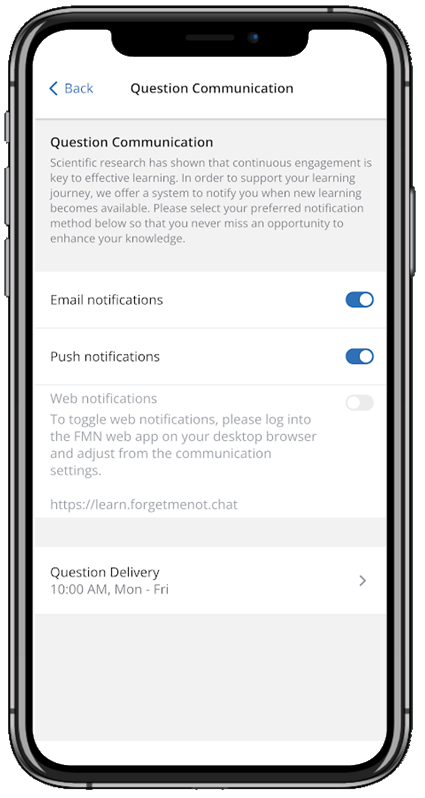


Email notifications - when enabled, question reminders will be sent to the registered email address.

✅ Email can't be disabled if push notifications is already disabled as at least one communications method must be active.

Push notifications - when enabled, question reminders will be sent as push notifications to the last registered mobile phone.

✅ Push can't be disabled if email notifications is already disabled as at least one communications method must be active.

Web notifications - when enabled, question reminders will be sent as browser notifications to the device with the logged in browser window

⚠️ Browser notifications are only displayed in the phone screen and can only be enabled / disabled from Learner Web Communication Settings

Question Delivery - the default question delivery time is 10am Monday to Friday with Saturday and Sunday as days off. You can change the defaults to question delivery time to the days and a time that works best for you


⚠️ Email notifications turned on and not receiving email notifications? Take a look at why hasn't my email arrived in my inbox?


Was this article helpful ?

Still need help?

Contact us

Forget Me Not® Learner App

Forget Me Not® Learner App

Watch a video to see how to personalise the appHow can I adjust the size of the text?How can I view questions that have been mastered?How can in-app sounds be disabled even with Silent Mode enabled?Why am I not getting question reminders on my iPhone?How can I watch a video again?Learner App My LearningLog in to Learner AppHow can I save the audio clip I just played?Login to Learner App with registered email and passwordLog in to Learner App with a social accountWhat can cause communications loss to the App?What happens if I get a new mobile device?Why has a Question Series disappeared from My Learning dashboard?Why do I get 'oops we've hit a snag - try again'Why are errors showing when accessing certain web app functions?How to sign-in on iPhone using an email that contains an apostrophe?How can I reset my password from the app?How much download data is used when viewing a Question Series?View Info - Learning ResourcesLearner App CertificatesCan I use the app on multiple phones at the same time?Learner App ResourcesAn Error has occurred when submitting questions in the mobile appLearner App forgot password optionsView Info - QuestionsSend Password Reset Link from Learner AppView Info - Series OverviewWhy am I not able to sign in to the app with my registered email?Personalise the Mobile App experienceSend a Magic Link from the Learner AppMagic Log in Link emailLearner App Communication SettingsSound EffectsHaptic FeedbackWhy isn't the App Install QR Code scan working?Learner App FMN AssistantHow to clear the App clear cache for Android phonesHow can I sign out from the Learner App?About Learning Resource DetailsLog in to Learner App with a work accountWhy am I not getting Push Notifications on my iPhone?How can I find the app version?Why is the typing indicator stuck?How do I uninstall the app?How to delete the App and clear cache for iPhoneLearner App Pathway OverviewHow can I adjust the size of an image?How do I update the app?About Learner App More FunctionsLearner App Set Question Delivery Notification TimeHow can I access Question Series across multiple mobile devices?